
Limits, usage and billing
£20 a month, including:
  5 users                     then £2 per user per month
  50 GB storage               then 5p per GB
  50 GB downloads a month     then 10p per GB
Limits
| Limit | Value |
|---|---|
| Concurrent sessions | 10 per SFTP user. An 11th login is refused with Too many open sessions for this user until one closes. |
| Transfer speed | 20 MB/s per session, uploads and downloads combined. Open more sessions to transfer several files in parallel. |
| File size | 156 GB per file |
| Failed logins | After 10 failed logins from one IP address, or for one username, further logins are refused for 15 minutes |
| SFTP users | 500 per organisation, counting unexpired users. Contact support if you need more. |
Uploads are streamed straight to storage as they arrive, so large files don't need to fit anywhere first. If an upload fails or is interrupted, nothing is stored, and it has to be started again from the beginning.
What's included
RepoForge SFTP is £20 a month per organisation, billed monthly. It's sold as an add-on to a RepoForge.io plan, or on its own as RepoForge SFTP. It isn't included in the free plan, and there's no free trial.
| Included | Beyond that | |
|---|---|---|
| SFTP users | 5 | £2 per user per month |
| Storage | 50 GB | 5p per GB |
| Downloads | 50 GB a month | 10p per GB |
Storage and downloads are shared by the whole organisation, not allowances per user, and extra users don't come with extra storage. Uploads are free and aren't counted.
How usage is measured and billed
- Users: every user whose expiry date hasn't passed counts. Expired users are free. Each user past the included 5 adds £2 a month, prorated from the day they're created and added to your next invoice. The dashboard shows the extra cost before you create a user past the included 5.
- Storage: the total size of all of your organisation's files, measured every day. You're billed for the latest measurement in each billing period, in whole GB beyond the included 50 GB, rounded down.
- Downloads: every byte downloaded by any user, counted when each file transfer finishes and added up over your billing period. Anything beyond the included 50 GB is billed in whole GB, rounded down; a part GB carries over.
Storage and download overage are billed in arrears, on the invoice after the billing period they were used in. There are no hard caps: going over an allowance never stops uploads or downloads.
The usage panel
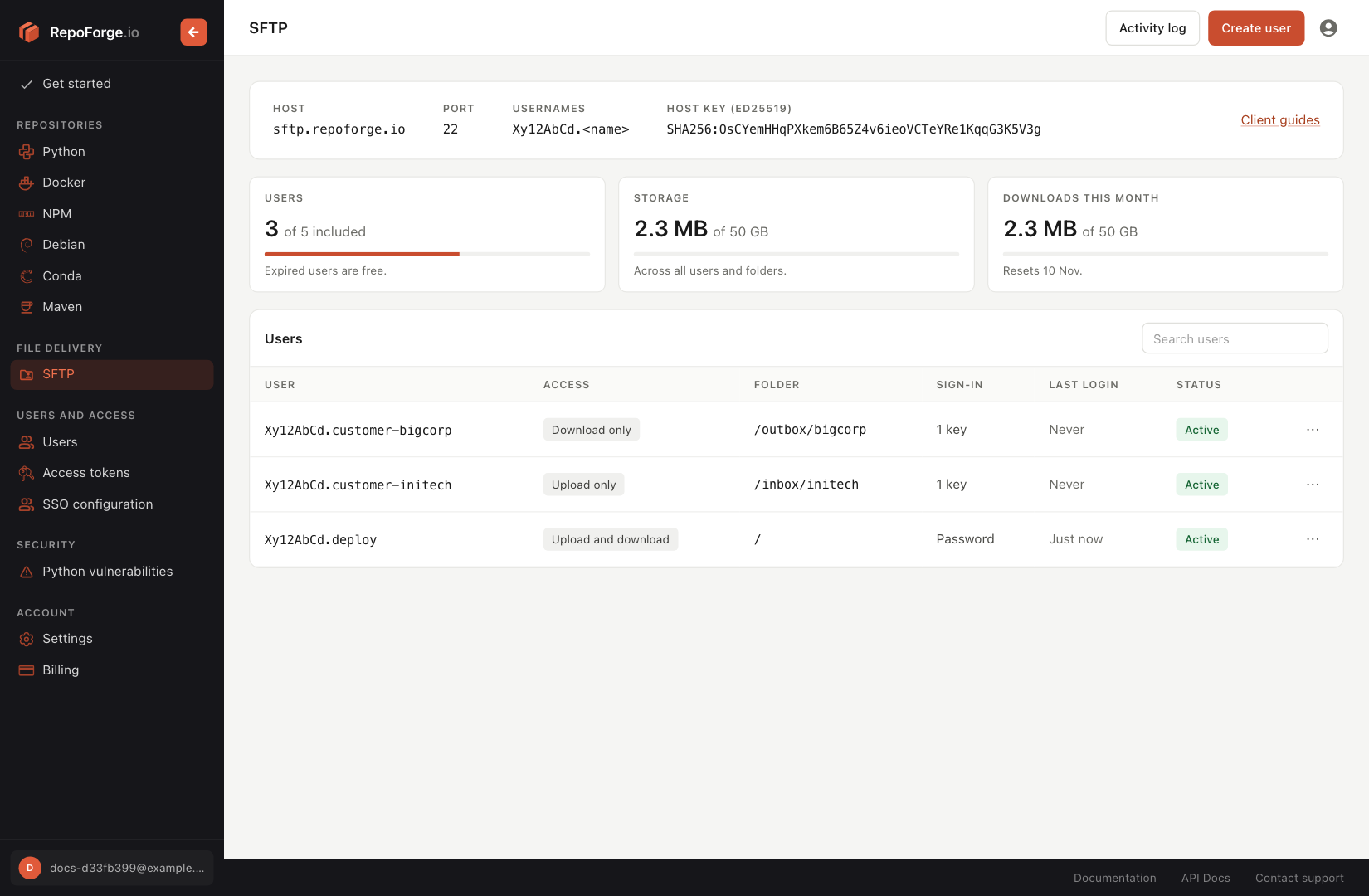
The SFTP page shows your usage this billing period:
- Users: how many users count towards your bill, out of the 5 included. Once you've used them, it shows what your next user adds each month.
- Storage: how much is stored now, across all users and folders, against the included 50 GB.
- Downloads this month: how much has been downloaded in this billing period, against the included 50 GB, and the date it resets.
At 80% of an allowance, the panel shows a warning with the per-GB price beyond it. Past the allowance, it shows how much you're over and roughly what that will cost so far. Your next invoice, including SFTP, extra users and overage so far, is on the Billing page.
The activity log
Click Activity log on the SFTP page to see every login, upload, download, delete, rename and folder created (mkdir) or removed (rmdir) in your organisation, newest first.
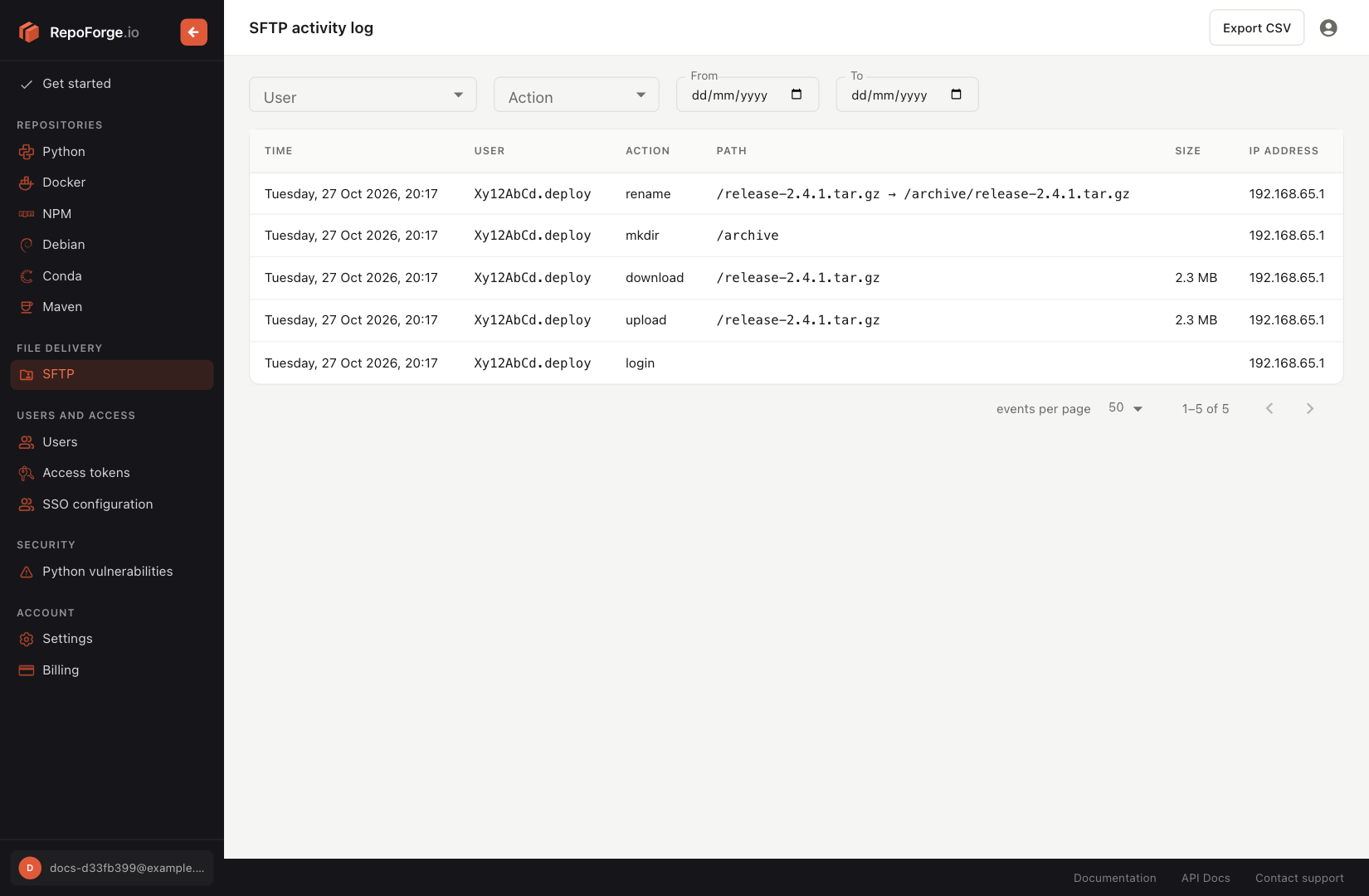
Each entry shows:
- Time
- User: the SFTP username
- Action
- IP address: where the user connected from
- Path: the file or folder, from the organisation's root rather than the user's home folder. Renames show where the file was moved from and to.
- Size: bytes uploaded, downloaded or deleted
Filter by User, Action, and a From and To date (in UTC).
Exporting the activity log
Click Export CSV to download sftp-audit-log.csv, with every entry that matches your current filters:
time,username,action,ip_address,from_path,path,size
2026-11-03T09:14:22+00:00,Xy12AbCd.deploy,login,203.0.113.7,,,
2026-11-03T09:14:25+00:00,Xy12AbCd.deploy,upload,203.0.113.7,,/inbox/build.zip,48213504
Removing SFTP
To stop paying for SFTP, open the Billing page and click Remove SFTP. If you also have a RepoForge.io plan, it isn't affected.
- SFTP stays on until the end of the current billing period, then logins stop for every user.
- Until then, you can click Keep SFTP on the SFTP page to carry on as before.
- Your files are deleted 30 days after SFTP ends. Download anything you want to keep before then; see Getting all your files out.